Did you know that Windows 7 has a GodMode? What GodMode does is enable you to have a place where you can get to all the settings without having to browse around and click through options and folders in control panel. This does not work on 64 bit systems!!
Add a new folder to your desktop and name it GodMode.{ED7BA470-8E54-465E-825C-99712043E01C}
After that is done you will see the following icon on your desktop

Now when you click on that icon you it will open up the following folder…isn’t that cool?
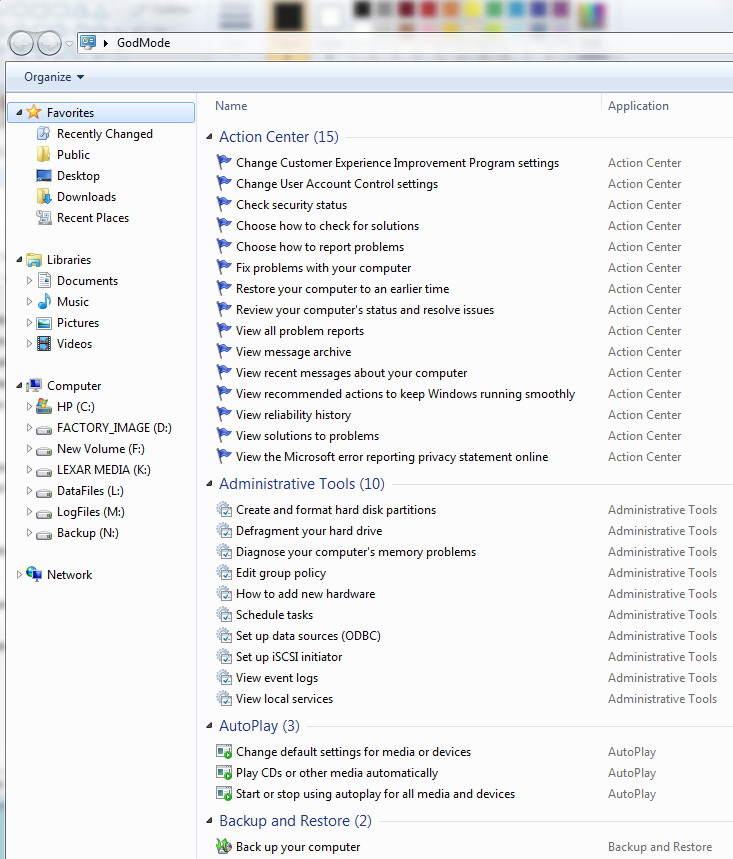
By the way there is much more in this folder than in the screenshot, in the screenshot you only see 4 sections, in the folder there are 46 different ones
Warning…although GodMode works on Vista 32 bit and 32 bit Windows Server 2008 it does not work on Vista 64 bit sp2 and 64 bit Windows Server 2008…see comments to fix it if you tried it on those operating systems